
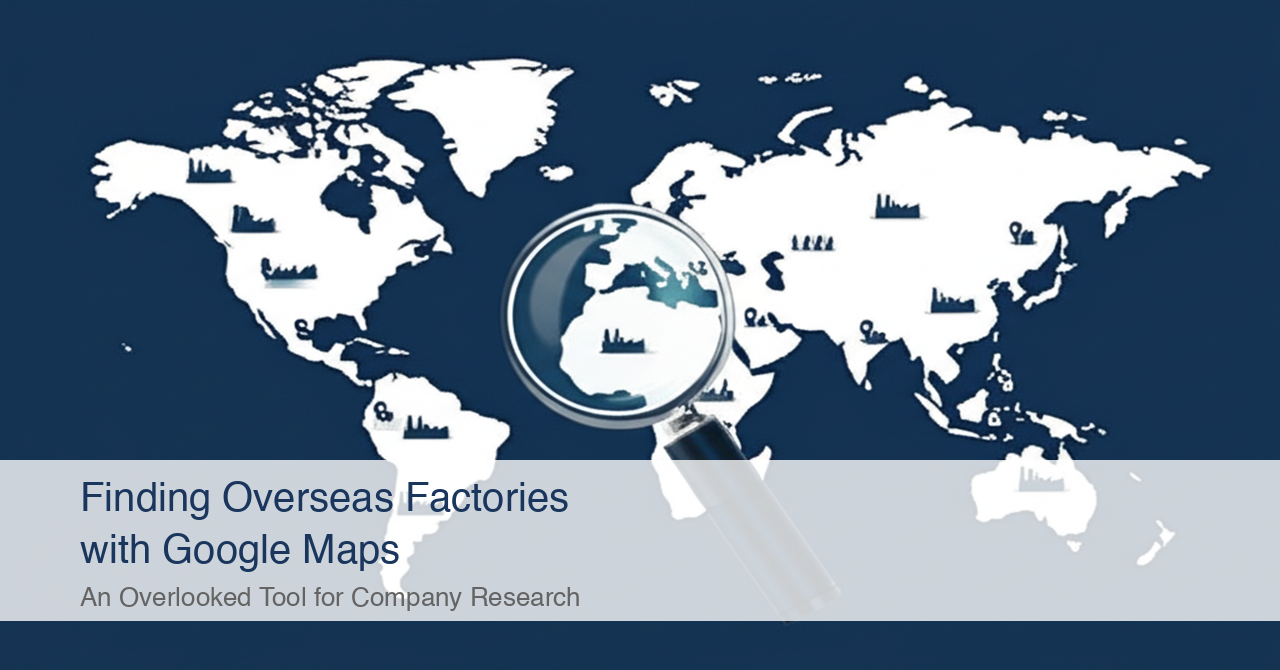
Google Maps is not just a navigation app. It is a source of corporate intelligence. Search by industrial estate name or industry keyword on the map, and you can find local companies that don't even have a website.
When people hear "overseas company research," few think of Google Maps. Most start with Google search, LinkedIn, or industry databases. That approach is not wrong.
But it misses a large number of companies. Many small and medium-sized manufacturers in ASEAN have no English website, yet they are registered on Google Maps.
In this article, I share specific methods for using Google Maps in corporate research, drawing on experience researching companies across 80+ countries. I cover not only the advantages but also the limitations — including the business category reliability problem.
What Kind of Company Information Does Google Maps Contain?
Google Maps has over 200 million businesses registered worldwide. Many companies without websites are still listed on Google Maps.
This far exceeds the number of companies registered on LinkedIn.
From a corporate research perspective, Google Maps contains the following information:
| Information | Use in Corporate Research |
|---|---|
| Company name (local language + English) | Reveals the official local-language name. Useful as a starting point for web searches |
| Address | Shows whether the company is inside an industrial estate and its proximity to other factories |
| Phone number | Can be used as a direct contact. Even companies without websites have phone numbers |
| Website | Some companies have one, some don't. Companies without websites are where Google Maps adds the most value |
| Photos | Factory exteriors, equipment, and product photos are sometimes uploaded |
| Reviews | Comments from business partners or employees can provide clues about the company's operations |
| Business category | Classifications like "Manufacturing" or "Food processing." However, accuracy is questionable (discussed below) |
The key point is that companies without websites are still listed on Google Maps. Many small factories in Thailand and Vietnam have no website, but their factory name and address are registered on Google Maps. Companies invisible on Google search can be found through map search.
Note that Google Maps is blocked in mainland China, so this approach does not work there directly. For Chinese corporate research, you need to use Chinese map services such as Baidu Maps or Amap (Gaode Maps), combined with corporate databases like Qichacha and Tianyancha. This article focuses on ASEAN and South Asia, where Google Maps is fully functional.
Searching Around Industrial Estates Is the Most Efficient Approach
The most efficient way to find companies on Google Maps is to search by industrial estate name and then explore the surrounding area. Factories are concentrated in industrial estates, which is where map-based search delivers the greatest value.
Here is the step-by-step process:
Step 1 — Identify major industrial estates in the target country
First, research the industrial estates in your target country. For Thailand, the Eastern Seaboard area (Chonburi and Rayong provinces) is the manufacturing hub. For Vietnam, industrial estates in Binh Duong and Dong Nai provinces are key.
Examples of major industrial estates:
| Country | Major Industrial Estates | Key Industries |
|---|---|---|
| Thailand | Amata Nakorn, WHA Eastern Seaboard, Nava Nakorn | Auto parts, electronics, food |
| Vietnam | VSIP Binh Duong, Long Duc, Thang Long | Electronics, textiles, food |
| Indonesia | MM2100, KIIC, Jababeka | Automotive, chemicals, food |
| India | Mahindra World City, Sri City, Tapukara | Automotive, IT, pharmaceuticals |
Step 2 — Search the industrial estate name on Google Maps
Open Google Maps and enter the industrial estate name. For example, typing "Amata Nakorn" zooms into the Amata Nakorn Industrial Estate in Chonburi Province, Thailand.
Step 3 — Search nearby by industry keyword
With the industrial estate displayed, enter an industry keyword in the search bar:
- "food factory"
- "plastic manufacturer"
- "auto parts"
Related companies within and around the industrial estate will appear as pins on the map.
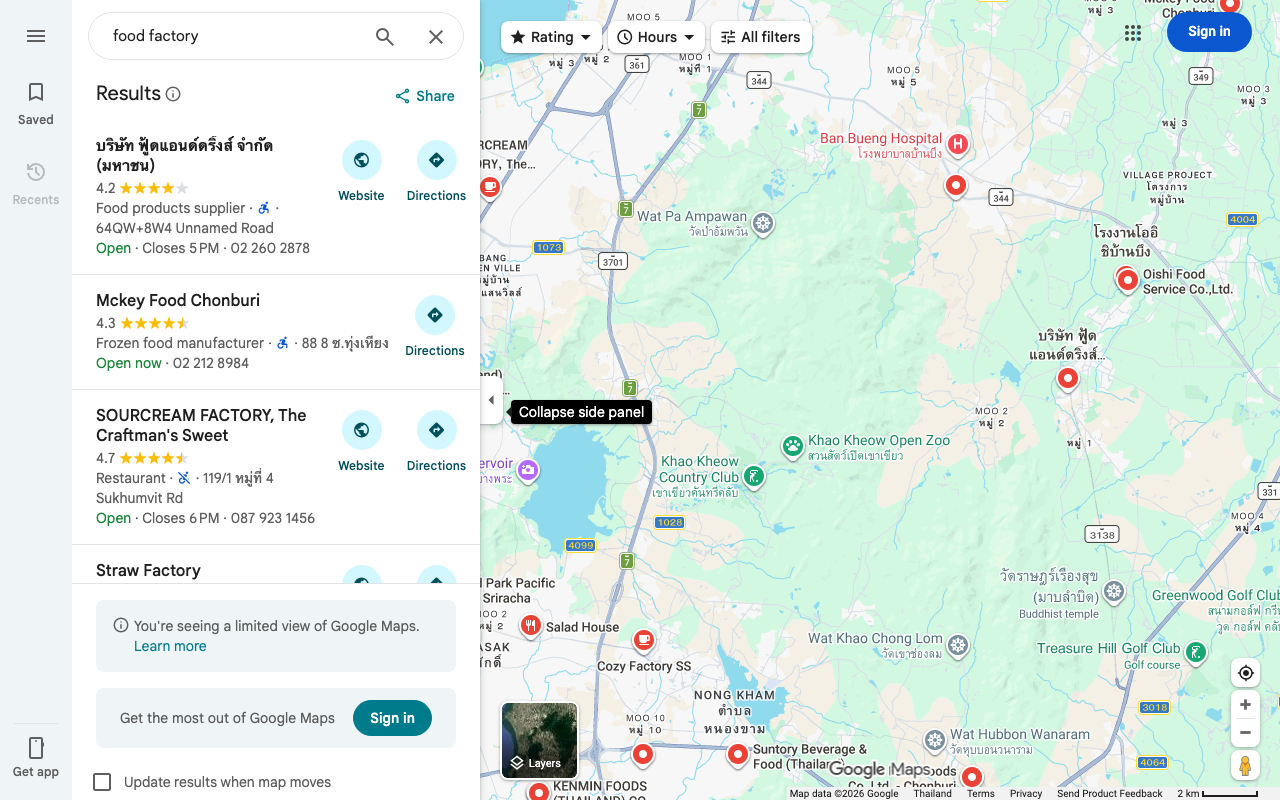
Step 4 — Check each company's details
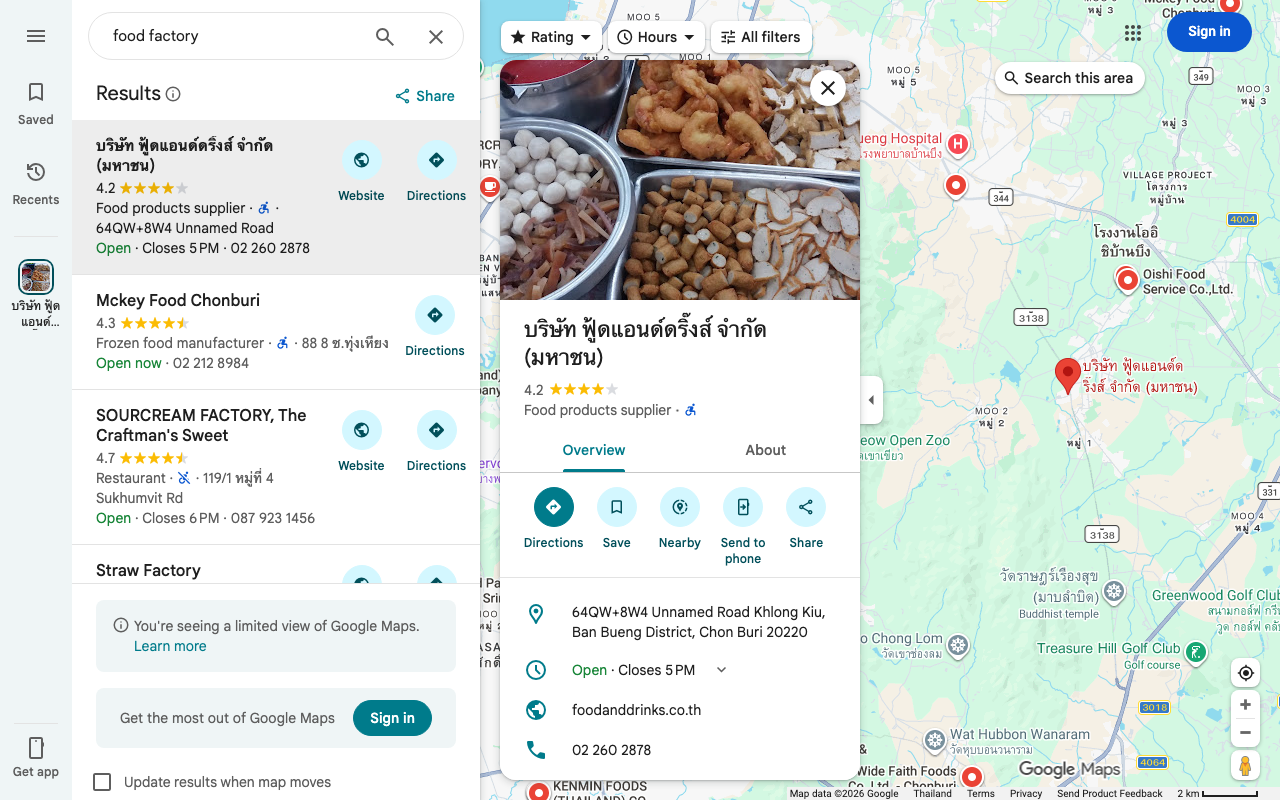
Click a pin to see the company name, address, phone number, website (if available), photos, and reviews. This information alone forms one row in your list.
💡 Need a verified list of overseas factories and suppliers?
We build custom company lists with verified data and local-language sources — from $2,000. Tell us what you’re looking for →
Searching in the Local Language Multiplies Results by 3–5x
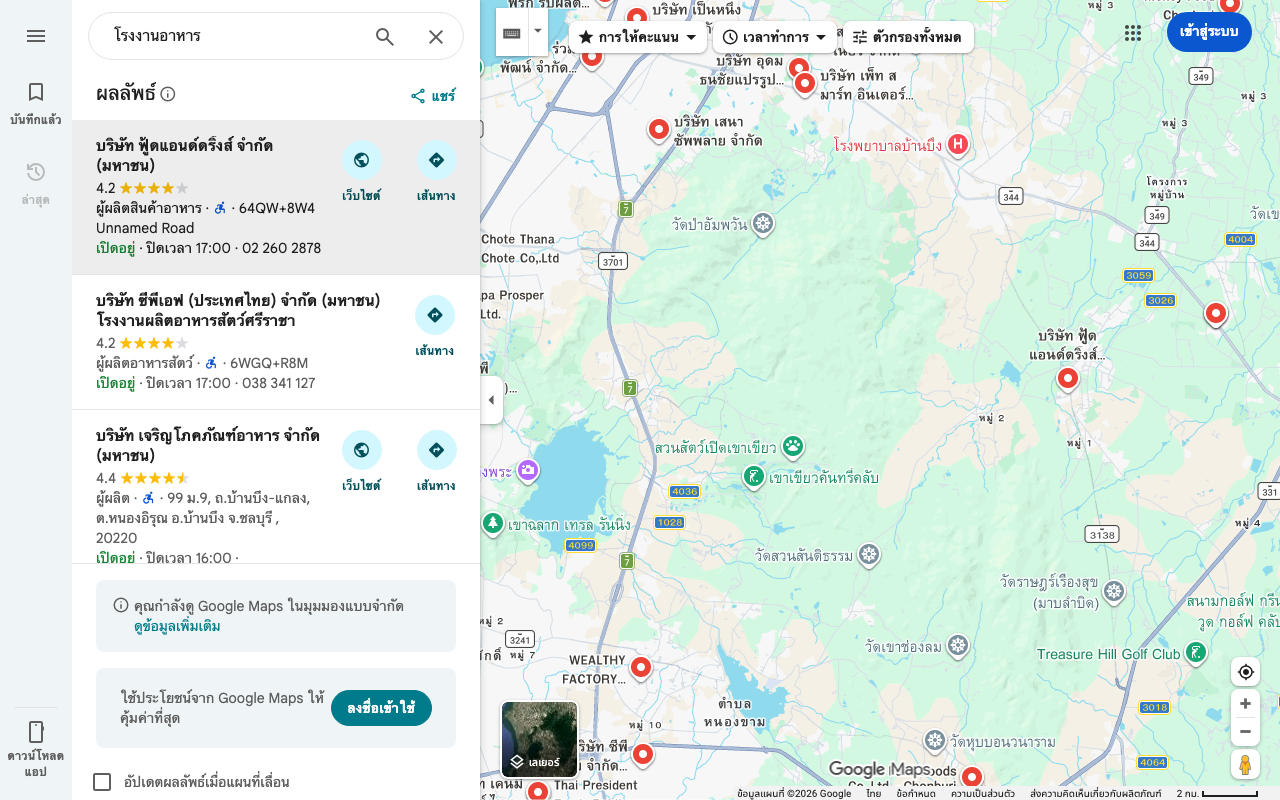
On Google Maps, the search language dramatically affects the number of companies displayed. Searching for "food factory" in English versus "โรงงานอาหาร" in Thai can yield 3–5 times more results.
This happens because Google Maps business listings are registered in the local language. Most small factories in Thailand are registered only under their Thai-language name. English searches only return companies with English names registered.
Based on my experience, here is the typical difference:
| Search Area | English Search Results | Local Language Results | Ratio |
|---|---|---|---|
| Chonburi Province: "food factory" / "โรงงานอาหาร" | ~15 | ~60 | ~4x |
| Dong Nai Province: "plastic manufacturer" / "nhà máy nhựa" | ~10 | ~35 | ~3.5x |
| Near Pune: "auto parts factory" / "ऑटो पार्ट्स फैक्ट्री" | ~12 | ~40 | ~3x |
This "language barrier" is something I discuss in detail in a separate article, "What You Miss When You Research Overseas Companies Only in English." The same phenomenon occurs on Google Maps.
The image below shows results from searching the same area in Thai ("โรงงานอาหาร" — food factory). More companies appear compared to the English search (previous image).
Even if you don't know the target country's language, you can translate industry keywords using Google Translate and paste them into Google Maps. The translation doesn't need to be perfect. Simply using local-language keywords dramatically increases the results.
Satellite Imagery Verifies a Company's Existence and Scale
Google Maps satellite imagery lets you visually confirm whether a company actually has a factory. You can also roughly estimate the business scale from the factory's footprint.
When building a company list, questions like "Does this company really have a factory?" and "Could this be a paper company?" frequently arise. Switching to Google Maps satellite view lets you check whether there's actually a factory building at the registered address.
Here's what satellite imagery can reveal:
| What to Check | What It Tells You |
|---|---|
| Factory building presence | Is there an actual building at the registered address? If the image shows vacant land or apartments, the listing is suspect |
| Site area | Rough business scale. A few thousand square meters suggests SME; tens of thousands suggests mid-to-large |
| Visible equipment | Chimneys, tanks, or large machinery confirm manufacturing operations |
| Truck presence | Active logistics. Trucks in the parking lot suggest the facility is operational |
| Surrounding environment | Inside an industrial estate or in a residential area? Location context helps assess the nature of the business |
This "satellite imagery verification" provides information that web search and database searches alone cannot deliver. It adds "physical existence" and "scale" to an address-only list.
Business Categories Are Unreliable — Google Maps' Biggest Weakness
Google Maps business categories are self-reported by companies. Accuracy varies widely. It's not uncommon for a company registered as "Manufacturer" to actually be a trading company.
This is the most critical caveat when using Google Maps for corporate research. Here are the specific issues:
| Problem | Example |
|---|---|
| Self-reported categories | Actually a trading company but registered as "Manufacturer" |
| Missing categories | Major factories with categories set to "Business center" |
| Coarse granularity | Listed only as "Food processing" — impossible to tell if it's seafood or dairy |
| Delayed closure information | A factory already shut down still shows as "Open" |
| Location inaccuracy | Pin placed several hundred meters from the actual factory |
Google's community forums also report cases where "obviously incorrect categories are not corrected even after being flagged." Category accuracy is a structural weakness of Google Maps.
Therefore, Google Maps should be treated as a "candidate discovery" tool only. Whether a company actually belongs to the target industry must be verified using other sources.
Combining with Other Sources Improves Accuracy
Google Maps is not meant to be used alone. "Candidate discovery" via Google Maps and "verification" via government databases or web search is the most efficient division of labor.
Here are the combinations I use in practice:
Pattern 1 — Discover on Google Maps, verify in government databases
Search for company names found on Google Maps in the target country's corporate registry database.
1. Find companies around industrial estates on Google Maps
2. Copy the company name (in local language)
3. Search in Thailand's DBD DataWarehouse+, or India's MCA (Ministry of Corporate Affairs) portal
4. Confirm registration details (capital, founding year, business description)
This adds registry-backed verification to the "candidates" found on Google Maps.
Pattern 2 — Verify government database addresses on Google Maps
The reverse pattern also works. Check addresses from government databases using Google Maps satellite imagery.
1. Extract a company list by industry code from a government database
2. Search each company's address on Google Maps
3. Confirm factory existence via satellite imagery
4. If vacant land or apartments appear, suspect a paper company
Pattern 3 — Explore the area around known competitors
Use a known company's factory as a starting point and explore the surroundings.
1. Display a known competitor's factory address on Google Maps
2. Search for the same industry within a 500m–2km radius
3. Find other companies in the same industry clustered within the industrial estate
Factories tend to form industry clusters. Near an auto parts manufacturer's factory, there is a high probability of finding other auto parts manufacturers. Leveraging this geographic proximity is a unique strength of map-based search.
Large-Scale Lists Require the API
When building a list manually on Google Maps, you can realistically cover around 50–100 companies per day. For lists of several hundred companies, Google Places API or specialized tools become necessary.
Manual search has its limits:
| Method | Approximate Daily Throughput | Best For |
|---|---|---|
| Manual search (browser) | 50–100 companies | Preliminary surveys of specific areas, visual confirmation of candidates |
| Google Places API | Thousands of companies | Comprehensive listing over wide areas |
| Specialized scraping tools | Thousands to tens of thousands | Large-scale data collection |
API usage requires technical knowledge and incurs usage fees. But for serious corporate listing projects, manual operations alone are not sufficient.
I combine Google Maps API with custom automation tools to efficiently collect corporate data across wide areas. However, even API-retrieved data still suffers from the category accuracy problems described above, so human review and screening are ultimately required.
Google Maps Excels as a "Candidate Discovery" Tool
Here is a summary of key points for using Google Maps in corporate research:
| Point | Detail |
|---|---|
| Google Maps' strength | Finds companies even without websites. Satellite imagery confirms physical existence |
| Most efficient approach | Search by industrial estate name, then explore nearby by industry keyword |
| Language impact | Searching in the local language multiplies results by 3–5x |
| Biggest weakness | Business categories are unreliable. Manufacturers registered as trading companies are common |
| Correct usage | Use for "candidate discovery" and verify with government databases or web search |
Google Maps is not a silver bullet. Given the category accuracy problem, it cannot produce a perfect list on its own. But as a supplementary tool for "discovering companies invisible to web search," it is extremely powerful.
Google search, government databases, certification databases, and Google Maps. Combining multiple information sources is how you build a comprehensive company list.
【Sources】
- Google "About Google Maps" Official product page
- Google "Google Maps Platform: Places API" API documentation
- Google Community Forums "Business category corrections" Various threads on category accuracy issues
- Thailand Board of Investment (BOI) "Industrial Estates in Thailand" List of promoted industrial zones
- Thailand Department of Business Development (DBD) "DBD DataWarehouse+" Thai corporate registry database
- India Ministry of Corporate Affairs (MCA) "MCA Services Portal" Indian corporate registry
- Vietnam General Statistics Office (GSO) "Industrial Zones" Statistics on industrial zones
- Indonesia Investment Coordinating Board (BKPM) "Industrial Estates" Information on industrial estates
Need ASEAN market intelligence?
Custom company research starting from $2,000.
(Western consultancies charge $10,000–50,000 for similar work.)
- ✓ 350+ projects completed across 80+ countries
- ✓ Delivered in 2–4 weeks
- ✓ Pay only for what you need — no retainer required
Overseas Market Research & Company List Building
Free initial consultation. Tell us about your research needs.